


$199
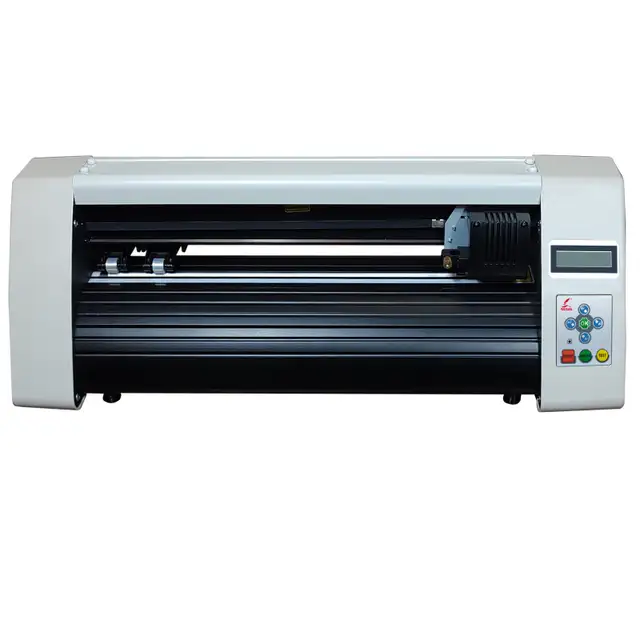
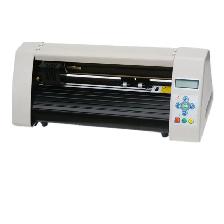
Desktop 15' Redsail Vinyl Sign Cutter Plotter Cutting Plotter
Description
Canadian seller! Sufficient stock! $199CAD plus TAX, Free Shipping!
Brand New
Desktop Vinyl Cutter Cutting Plotter RS500C With Paper Feeder & Artcut Software
Applied for Vinyl Stickers, T-shirts Heat Transfer, Car Stickers, etc
Low cost Desktop Cutting Plotter is designed for office and home use.
12 Months Warranty Free technical support
This is the only cutter that you need and that will serve you for many years to come.
*********************************************************************
--Description
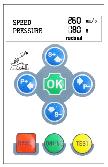
· Friendly operation panel, Blue backlight LCD is clearer and brighter.
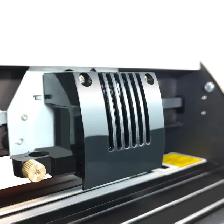
· Metallic blade holder. Compatible with Roland blades.
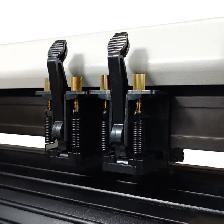
· Dual spring pinch roller assembly.
· USB 2.0 interface.
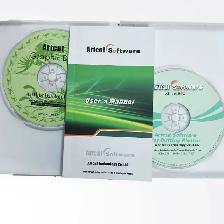
· Artcut softeware, professional signmaking software. Free Graphic Disk also included.
· Manually contour cut function (optional)
*********************************************************************
--Features
· Media Size (cm): 50 (20")
· Cutting Size (cm): 40 (15")
· Cutting Speed: 10-60cm/s
· Cutting Force: 10-500g
· LCD Display: English
· Resolution: 0.0254MM/step
· Repeatability(mm): 0.0254MM/step
· Command: HPGL
· Interface: USB
· Machine Size (W×L×H cm): 66×24×22
· Carton Packing Size (W×L×H cm): 76×31×33
· G.W: 10kg
· Power Supply: AC 90~240V / 50~60Hz
NOTE: THIS WORKS WITH WINDOWS XP, 7, 8 AND 10. NOT COMPATIABLE WITH MAC.
*********************************************************************
--Included Items
· Brand New 15" Vinyl Cutter
· Simple Vinyl Feeder
· Blade Holder
· 3 x 45° Cutter Blades
· Pen holder
· Power Cord
· USB Cable
· User Manual
· Artcut Software
*********************************************************************
--Contact Us
Tel: (905) 955-6528
Facebook: https://www.facebook.com/signcut.ca/
*********************************************************************
--Shipping
You can pick up the machine in our warehouse, also we can send it to you by FedEx Ground.
Note: If self-pickup is not possible, an additional shipping fee of approximately 60–80 CAD will be charged.
*********************************************************************
--We have more vinyl cutter with different size.
· RS500C(Desktop) : Cutting Size 15" (40cm)
· RS720C(W/Stand) : Cutting Size 24" (63cm)
· RS800C(W/Stand) : Cutting Size 28" (70cm)
· RS1120C(W/Stand) : Cutting Size 40" (100cm)
· RS1360C(W/Stand) : Cutting Size 48" (120cm)
*********************************************************************
--Returns
· 15% restocking fee will be subtracted from all returns.
· Items must be in Original packaging and all items originally included by the manufacturer. Return shipment is paid by customer. Items purchased may be returned up to 14 days from the delivery date. Opened Software is not refundable.
· You can expect to receive your refund with 6-10 Business Days of the item being physically received. The timeframe includes product inspection and refund processing. Missing or damaged items will result in a reduction in refund.
· All shipping costs are non-refundable and if you return an item that is offered with free or including shipping, the shipping cost will be deducted from your refund.
*********************************************************************
--Support.
Our local technicians can assist with the installation and setup of the plotter, but they do not provide training on the specific operation of the plotter or the included software. Please refer to the product manual or online YouTube video tutorials.
More products and accessories, welcome to visit our website: www.signcut.ca.
*********************************************************************
--Locknut holder's shell close screw blade
On the working state, the knife can rotate in holder very smoothly. In the first time you can screw the "close screw" off the "holder's shell", set the blade into bottom of holder, then close the "close screw" to avoid the knife falling out, let the knife peep out of the holder less than 0.5mm. When you want to change the blade, take out the old blade, change a new one, then close the" close screw", keep the blade peep out of the holder less than 0.5mm. (The locknut will not screw, usually).
*********************************************************************
--Close screw Holder shell Plotting pen.
You can use usual ball pen as plotting pen; keep the ball pen peep out of the holder between 4mm and 5mm. the other using method is similar as blade's process; please try it yourself according to the blade's changing method.
*********************************************************************
--The life of Cutting Knife Blade:
The correct usage could prolong the life of blade.
(1)The more length the blade sharp extends out, the shorter life blade will work. So you should avoid cut through the paper.
(2)The more Force, the blade life will get short.
(3)Trying to use small Force, when the blade edge is getting less sharp, you could add the working force suitable.
(4)Different brand blades will have different life.
(5)You should change the blade when you find the old one has no tartness, to avoid affecting the work badly.
*********************************************************************
How to fix and setup the cutting knife blade?
Turn off the plotter power.
Set the holder on holder's seat; close the screw of seat of holder. Turn on the power, the carriage will move to right side; you can press "TEST" key to examine the plotter.
*********************************************************************
--Remark:
A.You should keep the blade clean and don’t break the blade sharp.
B.The length out of the cover should be just a little bit, say 0.2mm around over the paper thickness which you will cut!
On the working state, the knife can rotate in holder very smoothly. In the first time you can screw the "close screw" off the "holder's shell", set the blade into bottom of holder, then close the "close screw" to avoid the knife falling out, let the knife peep out of the holder less than 0.5mm. When you want to change the blade, take out the old blade, change a new one, then close the" close screw", keep the blade peep out of the holder less than 0.5mm. (The locknut will not screw, usually).
*********************************************************************
How to load media?
Steps: Load media / Load paper:
When you move the roller, you must lift the handle first; the right roller will not move, usually. Lift the handle, the roller will lift 1 - 2mm, and then you can load your media. Laying down the handle, you can press "UP" key (S ) or "DOWN" key (S-) continuously, the paper will roll to front or back; please confirm the paper must move straightly during the distance that you want to cut. Adjust the speed and pressure, and then you can output the data to the plotter.
*********************************************************************
Thanks for your business.
Brand New
Desktop Vinyl Cutter Cutting Plotter RS500C With Paper Feeder & Artcut Software
Applied for Vinyl Stickers, T-shirts Heat Transfer, Car Stickers, etc
Low cost Desktop Cutting Plotter is designed for office and home use.
12 Months Warranty Free technical support
This is the only cutter that you need and that will serve you for many years to come.
*********************************************************************
--Description
· Friendly operation panel, Blue backlight LCD is clearer and brighter.
· Metallic blade holder. Compatible with Roland blades.
· Dual spring pinch roller assembly.
· USB 2.0 interface.
· Artcut softeware, professional signmaking software. Free Graphic Disk also included.
· Manually contour cut function (optional)
*********************************************************************
--Features
· Media Size (cm): 50 (20")
· Cutting Size (cm): 40 (15")
· Cutting Speed: 10-60cm/s
· Cutting Force: 10-500g
· LCD Display: English
· Resolution: 0.0254MM/step
· Repeatability(mm): 0.0254MM/step
· Command: HPGL
· Interface: USB
· Machine Size (W×L×H cm): 66×24×22
· Carton Packing Size (W×L×H cm): 76×31×33
· G.W: 10kg
· Power Supply: AC 90~240V / 50~60Hz
NOTE: THIS WORKS WITH WINDOWS XP, 7, 8 AND 10. NOT COMPATIABLE WITH MAC.
*********************************************************************
--Included Items
· Brand New 15" Vinyl Cutter
· Simple Vinyl Feeder
· Blade Holder
· 3 x 45° Cutter Blades
· Pen holder
· Power Cord
· USB Cable
· User Manual
· Artcut Software
*********************************************************************
--Contact Us
Tel: (905) 955-6528
Facebook: https://www.facebook.com/signcut.ca/
*********************************************************************
--Shipping
You can pick up the machine in our warehouse, also we can send it to you by FedEx Ground.
Note: If self-pickup is not possible, an additional shipping fee of approximately 60–80 CAD will be charged.
*********************************************************************
--We have more vinyl cutter with different size.
· RS500C(Desktop) : Cutting Size 15" (40cm)
· RS720C(W/Stand) : Cutting Size 24" (63cm)
· RS800C(W/Stand) : Cutting Size 28" (70cm)
· RS1120C(W/Stand) : Cutting Size 40" (100cm)
· RS1360C(W/Stand) : Cutting Size 48" (120cm)
*********************************************************************
--Returns
· 15% restocking fee will be subtracted from all returns.
· Items must be in Original packaging and all items originally included by the manufacturer. Return shipment is paid by customer. Items purchased may be returned up to 14 days from the delivery date. Opened Software is not refundable.
· You can expect to receive your refund with 6-10 Business Days of the item being physically received. The timeframe includes product inspection and refund processing. Missing or damaged items will result in a reduction in refund.
· All shipping costs are non-refundable and if you return an item that is offered with free or including shipping, the shipping cost will be deducted from your refund.
*********************************************************************
--Support.
Our local technicians can assist with the installation and setup of the plotter, but they do not provide training on the specific operation of the plotter or the included software. Please refer to the product manual or online YouTube video tutorials.
More products and accessories, welcome to visit our website: www.signcut.ca.
*********************************************************************
--Locknut holder's shell close screw blade
On the working state, the knife can rotate in holder very smoothly. In the first time you can screw the "close screw" off the "holder's shell", set the blade into bottom of holder, then close the "close screw" to avoid the knife falling out, let the knife peep out of the holder less than 0.5mm. When you want to change the blade, take out the old blade, change a new one, then close the" close screw", keep the blade peep out of the holder less than 0.5mm. (The locknut will not screw, usually).
*********************************************************************
--Close screw Holder shell Plotting pen.
You can use usual ball pen as plotting pen; keep the ball pen peep out of the holder between 4mm and 5mm. the other using method is similar as blade's process; please try it yourself according to the blade's changing method.
*********************************************************************
--The life of Cutting Knife Blade:
The correct usage could prolong the life of blade.
(1)The more length the blade sharp extends out, the shorter life blade will work. So you should avoid cut through the paper.
(2)The more Force, the blade life will get short.
(3)Trying to use small Force, when the blade edge is getting less sharp, you could add the working force suitable.
(4)Different brand blades will have different life.
(5)You should change the blade when you find the old one has no tartness, to avoid affecting the work badly.
*********************************************************************
How to fix and setup the cutting knife blade?
Turn off the plotter power.
Set the holder on holder's seat; close the screw of seat of holder. Turn on the power, the carriage will move to right side; you can press "TEST" key to examine the plotter.
*********************************************************************
--Remark:
A.You should keep the blade clean and don’t break the blade sharp.
B.The length out of the cover should be just a little bit, say 0.2mm around over the paper thickness which you will cut!
On the working state, the knife can rotate in holder very smoothly. In the first time you can screw the "close screw" off the "holder's shell", set the blade into bottom of holder, then close the "close screw" to avoid the knife falling out, let the knife peep out of the holder less than 0.5mm. When you want to change the blade, take out the old blade, change a new one, then close the" close screw", keep the blade peep out of the holder less than 0.5mm. (The locknut will not screw, usually).
*********************************************************************
How to load media?
Steps: Load media / Load paper:
When you move the roller, you must lift the handle first; the right roller will not move, usually. Lift the handle, the roller will lift 1 - 2mm, and then you can load your media. Laying down the handle, you can press "UP" key (S ) or "DOWN" key (S-) continuously, the paper will roll to front or back; please confirm the paper must move straightly during the distance that you want to cut. Adjust the speed and pressure, and then you can output the data to the plotter.
*********************************************************************
Thanks for your business.
When you call, please mention you found this ad on OKZ.ca
$199
Desktop 15' Redsail Vinyl Sign Cutter Plotter Cutting Plotter

PowerSigns
Email Verified
Feb 2018
Member Since
183736
Listings
~2 hrs
Response
Safety Tips
- Meet in a public place
- Never send money in advance
- Inspect item before paying
- Trust your instincts